


All your chats, one window
Tabs for every channel with live dots and unread counters. Drag to reorder, Ctrl+1-9 to jump.
Kixo is a lightweight desktop chat client for Kick. Every chat you follow in one window, with Kick & 7TV emotes, real badges, mod tools and an OBS overlay — built on Kick's official API.

Built for chatters who follow ten streams, mods who need to act fast, and streamers who want chat on top of their game.
Tabs for every channel with live dots and unread counters. Drag to reorder, Ctrl+1-9 to jump.
Channel and global emotes from Kick and 7TV, a searchable picker, :emote autocomplete and Tab-completion.
Hover a message to delete or time out. User cards show account age, follow date, sub months and recent messages.
A Mentions tab across every channel, custom highlight words, sound + desktop notifications.
Hide bots, ignore users, search chat with Ctrl+F. Chat pauses when you scroll up — no more losing your place.
One connection for all channels, batched rendering, ~300 KB of UI. Smooth even in the busiest chats.
Dark, Midnight (OLED), Slate and Light themes, any accent colour, font & emote size, compact mode.
Login, sending and moderation use Kick's official OAuth API. Tokens are encrypted by your OS keychain.
Automatic updates in the background. Free forever, open source under MIT.
A free OBS chat overlay for any Kick channel: Kick & 7TV emotes, badges, name colours, transparent background, auto-fading messages. Nothing to install. Type your channel, copy the link, add it as a Browser Source.
https://kixo.app/overlay?channel=ces4rrs&fade=30
Width 400 · Height 600 works well. Works even when Kixo isn't running.

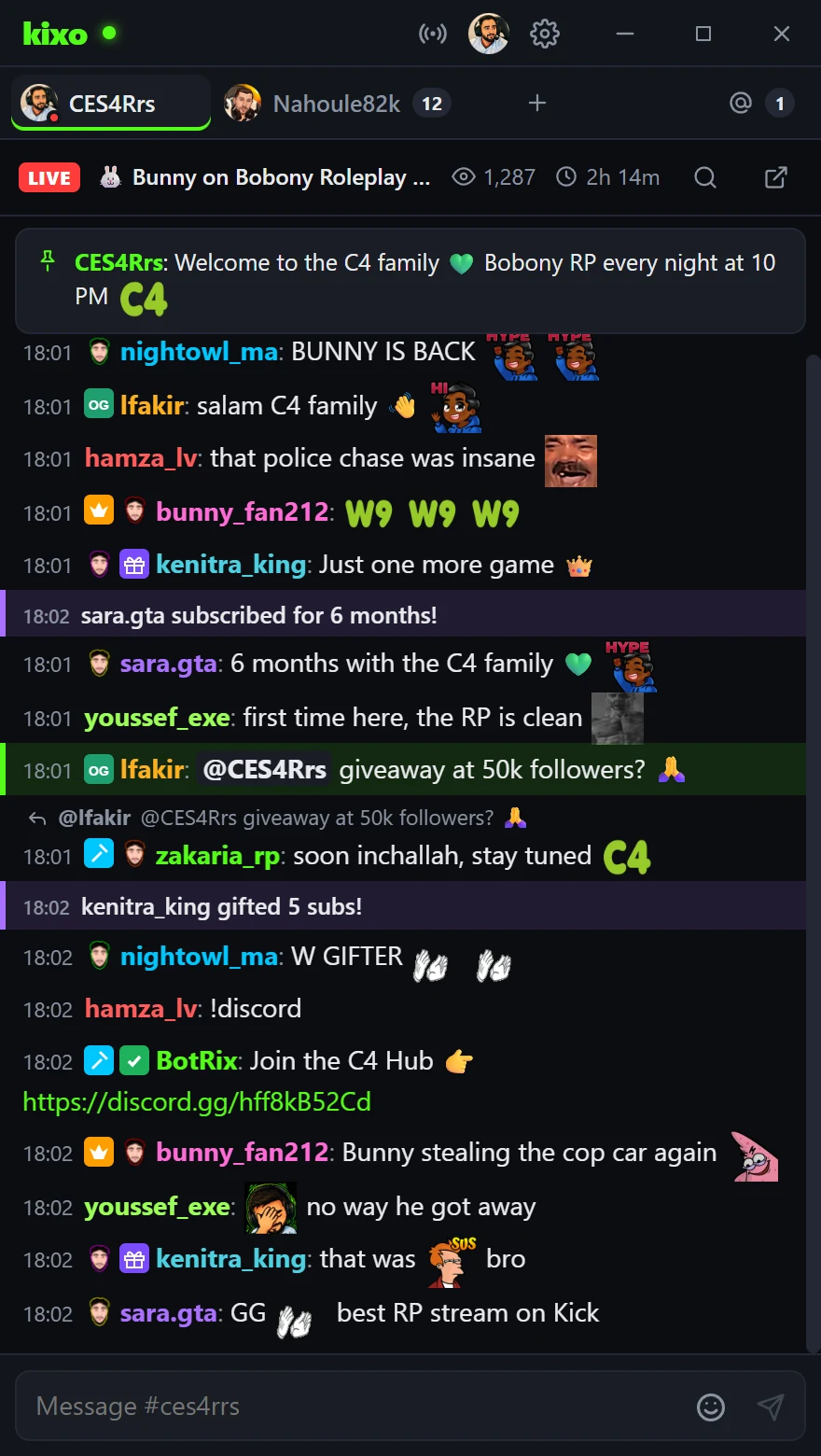
Kixo running on CES4Rrs's channel — click through the features.
Live chat with custom channel emotes, sub badges, replies and gift alerts.
Latest version: v1.0.0
Windows may show “Windows protected your PC” because Kixo isn't code-signed yet. Click More info → Run anyway. The source is fully open.
Yes — free forever and open source under the MIT license. No ads, no tracking.
Not to read chat. Log in with Kick when you want to send messages, moderate, or edit your stream info.
Sending messages, moderation and stream edits go through Kick's official Public API with OAuth 2.1. Kixo never sees your password, and tokens are encrypted with your operating system's keychain. The live chat feed uses the same public stream kick.com shows logged-out viewers.
Yes — channel and global 7TV emotes render automatically next to Kick emotes. You can turn them off in Settings.
Use the overlay builder above, or add a Browser Source in OBS with https://kixo.app/overlay?channel=yourname. No
install or account needed. Options like &fade=30, &size=18, &bg=1 and &bots=0 let you tune it.
No. Kixo is an independent community project and isn't affiliated with or endorsed by Kick.